Manage Onboarding Stages
Applies to: Compliance Officers, Administrators
Onboarding Stages define the step-by-step process that customers go through during account verification, with each stage granting specific permissions.
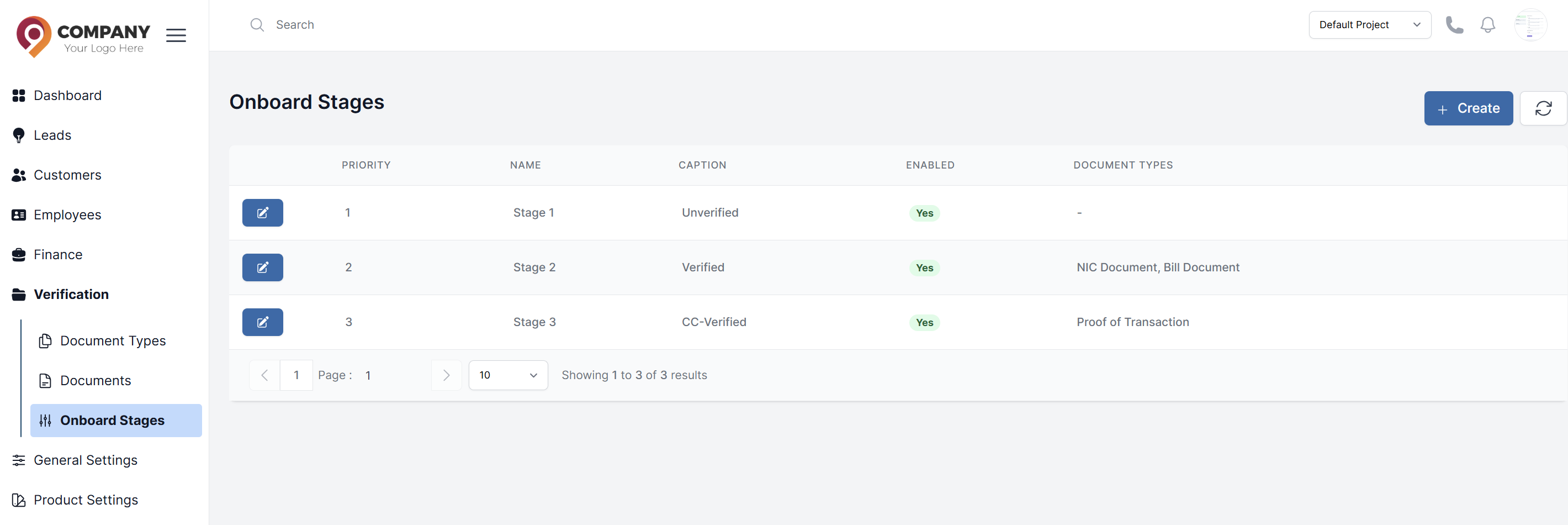
Understanding Onboarding Stages
KYC Levels determine what actions customers can perform based on their verification status. Each level grants specific permissions and limits.
Higher KYC levels provide access to advanced features such as:
Levels are typically structured like:
- Copy trading functionality
- Automated bot trading
- Loyalty programs and rewards
- Emergency deposit options
- Increased trading and withdrawal limits
- Enhanced security features
- Priority customer support
Configuring KYC Levels
- Navigate to Verification > Onboard Stages
- You will see existing levels with their permissions
- To edit a level, click on it and modify:
- Permissions: Trading limits, withdrawal limits, deposit limits, and other advanced features
- Requirements: Which documents are required to reach this level
- Automated Approval: Whether level upgrades happen automatically after document verification
Setting Level Requirements
For each level, specify which documents from Document Types are required:
- Level 1 might require 1x Proof of Identity
- Level 2 might require Proof of Identity + Proof of Address
- Level 3 might require additional documents like Proof of Funds
Edit Onboard Stage
Navigate to the onboard stage and click Edit to modify stage settings.
- Priority: Stage order number
- Document Types: Select required documents for verification
- Permissions: Select available user permissions from the list
- Limits: Set reuired limits
- Allowed Features: Select allowed features
- Denied Features: Select denied features