Allow Emergency Deposit for a Client
Applies to: Administrators, CRM Managers
This guide explains how to enable the Emergency Deposit functionality for specific customers who may need access to emergency funds during critical trading situations.
Steps to Enable Emergency Deposit
1. Navigate to Customer Profile
- Navigate to the CRM
- Select the desired customer from the customer list
- Click on the customer to open their detailed profile
2. Enable Emergency Deposit Functionality
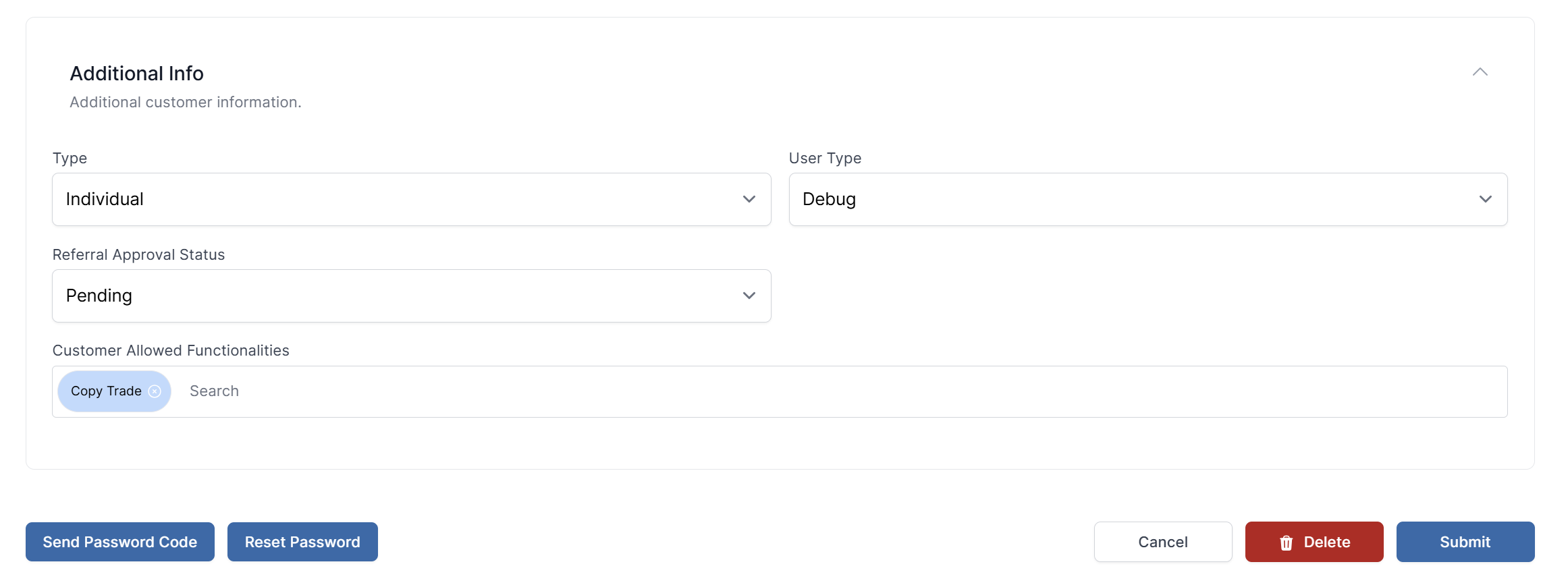
- Select Additional Info from the available options
- Locate the field named Customer Allowed Functionalities
- Add
Emergency Depositto the list of allowed functionalities - Save the changes to apply the new settings
Important Considerations
- Eligibility Assessment: Only enable this feature for customers with good trading history
- Risk Management: Consider the customer's risk profile before enabling
- Limit Settings: Emergency deposit limits are calculated automatically based on account metrics
- Monitoring: Regularly review customers with emergency deposit access
Verification
After enabling:
- The customer will see the Emergency Deposit option in their Client Portal under Funds menu
- The system will automatically calculate their maximum allowable amount based on their account metrics
- All emergency deposit activities will be logged