View Emergency Deposits
Applies to: Administrators, Finance Managers, Risk Officers
This guide explains how to monitor, manage, and review all emergency deposit activities through the CRM interface.
Accessing Emergency Deposits in CRM
Navigation Path
- Go to CRM from the main sidebar
- Navigate to Finance → Emergency Deposit
- You will see a comprehensive list of all emergency deposits
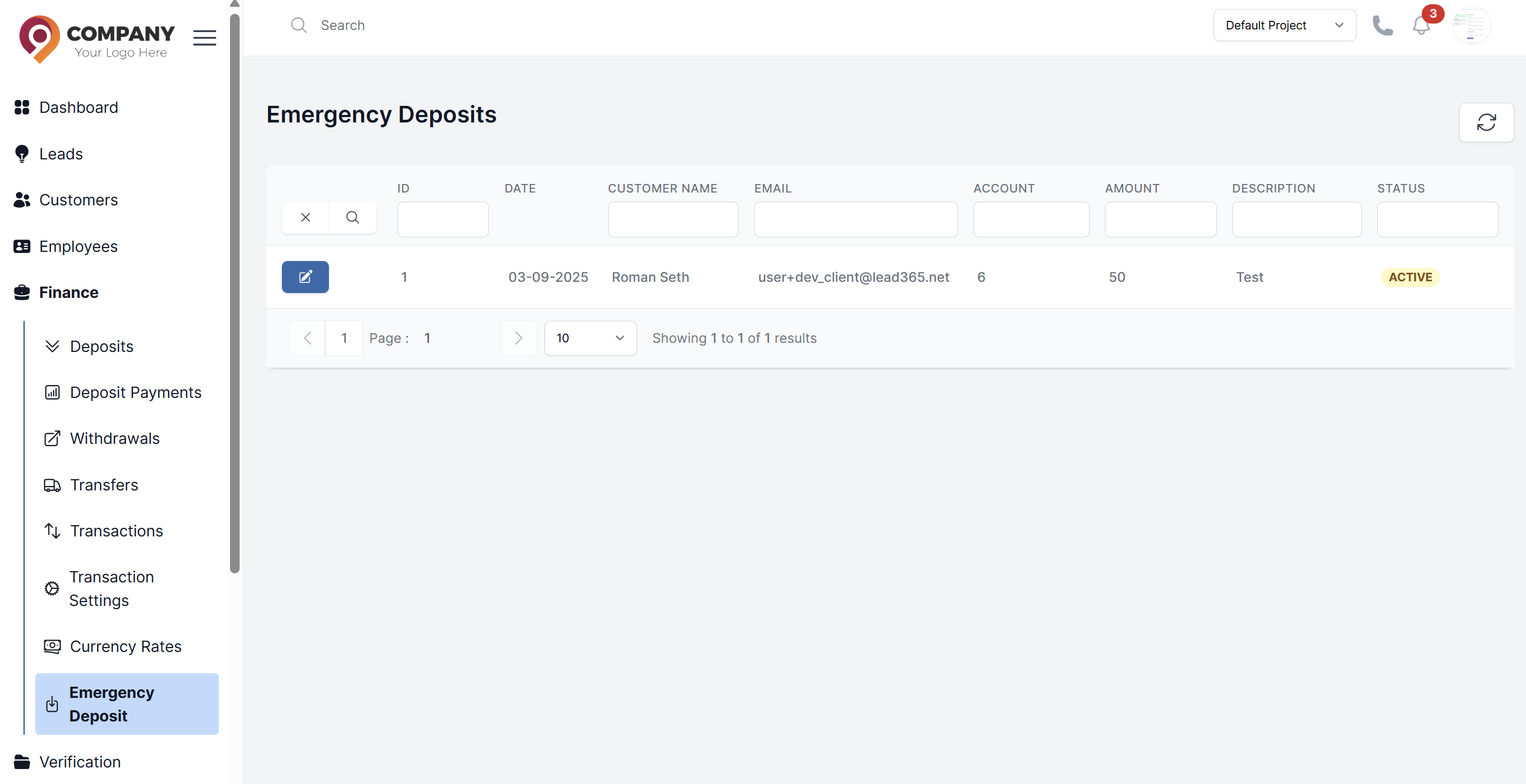
Emergency Deposits List View
The table displays these columns for each emergency deposit:
- ED ID: Unique emergency deposit identifier
- Customer Name: Client who requested the emergency deposit
- Account: Trading account where funds were deposited
- Amount: Emergency deposit amount
- Request Date: When the ED was created
- Status: Current status
- Actions: Management options
Status Types
Active Statuses
- Active: ED is active and within 72-hour window
- Partially Paid: Some amount repaid, still within timeframe
Completed Statuses
- Paid: Fully repaid by customer within 72 hours
- System Paid: Automatically settled by system with fine
- Manual Paid: Repaid manually by administrator
Management Actions
For Active Emergency Deposits
Click the Action Button to access these options:
Manual Repayment
- Use when customer makes offline payment
- Click the
Actionbutton - Click the Repay button after verification
View Details
- See complete ED calculation details
- View repayment history and partial payments
- Check time remaining for repayment
- Review customer information and account status
Monitoring and Reporting
Real-time Monitoring
- Active ED Count: Number of currently active emergency deposits
- Total Exposure: Sum of all active ED amounts
- Approaching Deadline: EDs with less than 12 hours remaining
Risk Management
High-risk Scenarios
- Multiple Active EDs: Same customer with multiple emergency deposits
- Large Amount EDs: EDs exceeding certain threshold amounts
- Frequent ED Usage: Customers using ED feature repeatedly
- Approaching Deadline: EDs with imminent repayment deadlines
Intervention Actions
- Contact Customer: Proactive communication for approaching deadlines
- Adjust Limits: Temporarily reduce or suspend ED privileges
- Account Review: Comprehensive risk assessment for frequent users
Best Practices
Regular Reviews
- Daily monitoring of active emergency deposits
- Weekly review of ED patterns and trends
- Monthly risk assessment reports
- Quarterly compliance audits
Customer Communication
- Automatic reminders for approaching deadlines
- Clear communication of terms and conditions
- Proactive support for repayment questions
- Transparency about fines and penalties