Create an Account Type
Applies to: Administrators, Product Managers
Account Types are templates that define the trading conditions for a group of accounts (e.g., Standard, Raw, VIP).
Create a New Account Type
- Navigate to Product Settings > Account Types.
- Click the Create button.
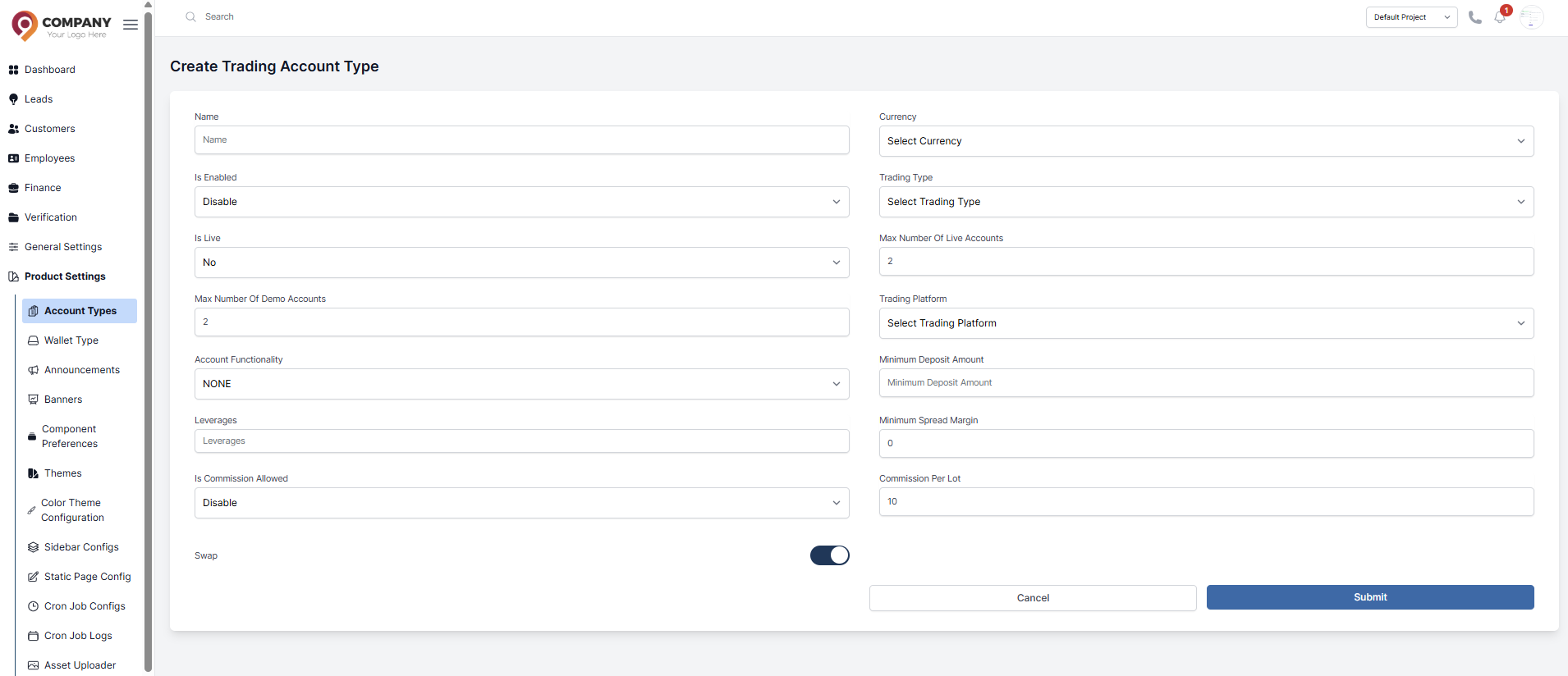
- Fill in the general information:
- Name: The public name (e.g., "VIP Account").
- Currency: The default account currency (e.g., USD, EUR).
- Leverage: The default leverage (e.g., 1:100).
- Configure other settings:
- Trading Type: Often "Spot" or "Margin".
- Commission: Enable/disable and set commission rates if applicable.
- Click Submit.
Configure Symbols for the Account Type
After creating the account type, you must define which symbols can be traded and their specific conditions.
- From the Account Types list, click Edit on your new type.
- Go to the Symbol Configurations tab.
- Here you can:
- Enable/Disable specific symbols (e.g., disable BTCUSD).
- Set Spreads: Define a custom spread for each symbol.
- Set Leverage: Override the default leverage for specific symbols.
- Bulk Upload: Use the "Upload via Excel" feature to update spreads for many symbols at once.