Manage Account Types
Applies to: Product Managers, Administrators
Account Types define the trading conditions and features available to different categories of trading accounts. This section allows you to create and manage these account classifications.
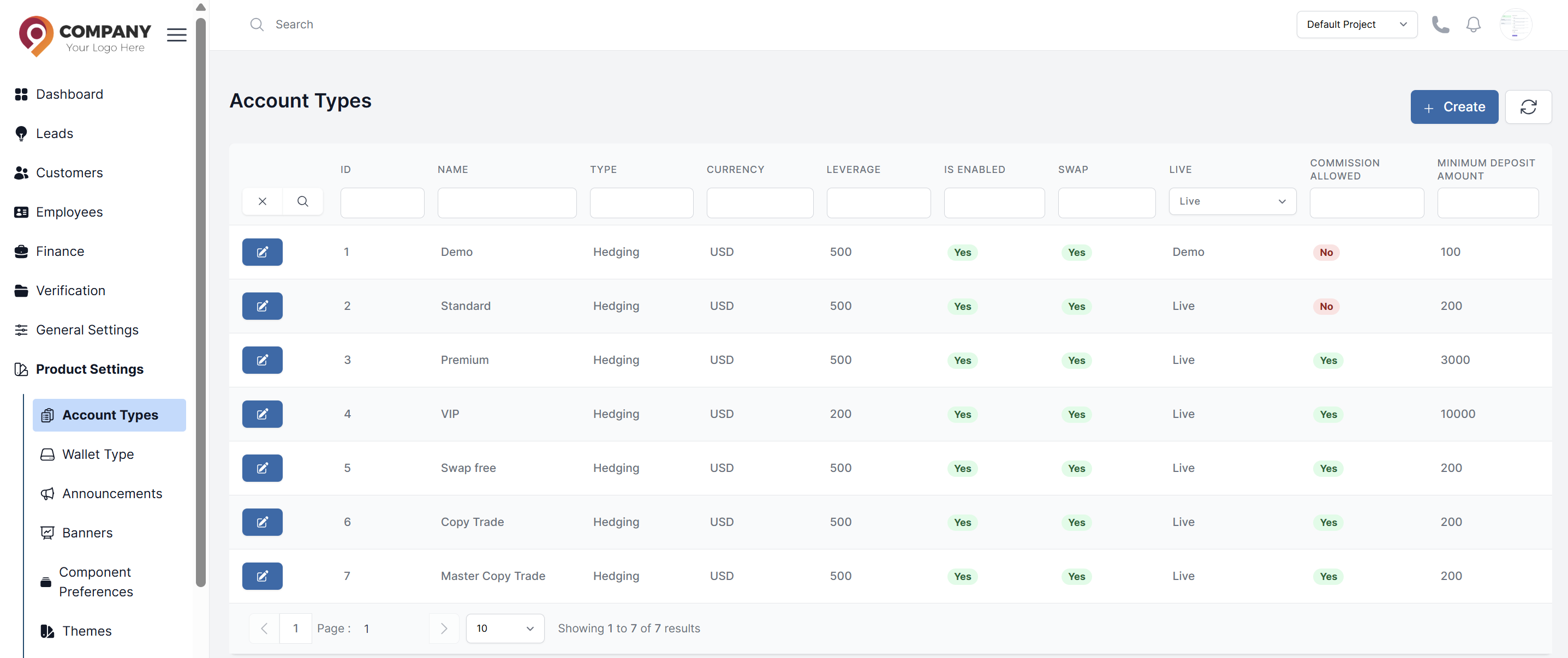
Accessing Account Types
- Navigate to Product Settings → Account Types
- View list of all existing account types
- Create new types or edit existing ones
Viewing Account Types
The account types list displays:
- Type Name: Descriptive name (e.g., Standard, VIP, Premium)
- Currency: Default account currency
- Leverage: Default leverage ratio
- Minimum Deposit: Required initial deposit
- Status: Active or Inactive
- Actions: Edit or configure options
Creating a New Account Type
- Click Create button
- Fill in the basic information:
Basic Configuration
- Name: Descriptive name (e.g., "VIP Account")
- Currency: Default account currency
- Trading Type: Hedging, Netting
- Leverage: Default leverage ratio (e.g., 1:100)
Financial Parameters
- Minimum Deposit: Required opening balance
- Commission Enabled: Yes/No
- Commission Rate: If commission enabled
- Swap Enabled: Yes/No for overnight financing
Editing Existing Account Types
- Find the account type in the list
- Click Edit button
- Modify desired parameters
- Click Submit
When editing an account type, access these configuration areas:
Account Type Information
- Basic account properties
- Financial parameters
- Feature enablement
Configuration
- Set spreads per trading symbol
- Configure leverage per instrument
- Enable/disable specific symbols
Symbol Configuration
Per-Symbol Settings
For each trading symbol, configure:
- Spread: Fixed or variable spread
- Leverage: Symbol-specific leverage
- Enabled: Available for trading
Bulk Operations
- Enable/Disable Multiple Symbols: Select and apply
- Spread Upload: Import spreads via Excel
- Leverage Update: Apply leverage to multiple symbols