Process a Transfer Request
Applies to: Administrators, Finance Managers
This guide walks you through reviewing and approving or rejecting a transfer request submitted by a customer.
Steps to Process a Transfer
1. Navigate to the Transfers Page
- In the main sidebar, click Customer.
- Then select Requests.
- Filter type column dropdown from Transfer
2. Locate the Pending Request
- The default view shows all transfers.
- Use the Status filter at the top of the table. Select
Pendingfrom the dropdown. - You can also use the search bar to find a customer by name or ID.
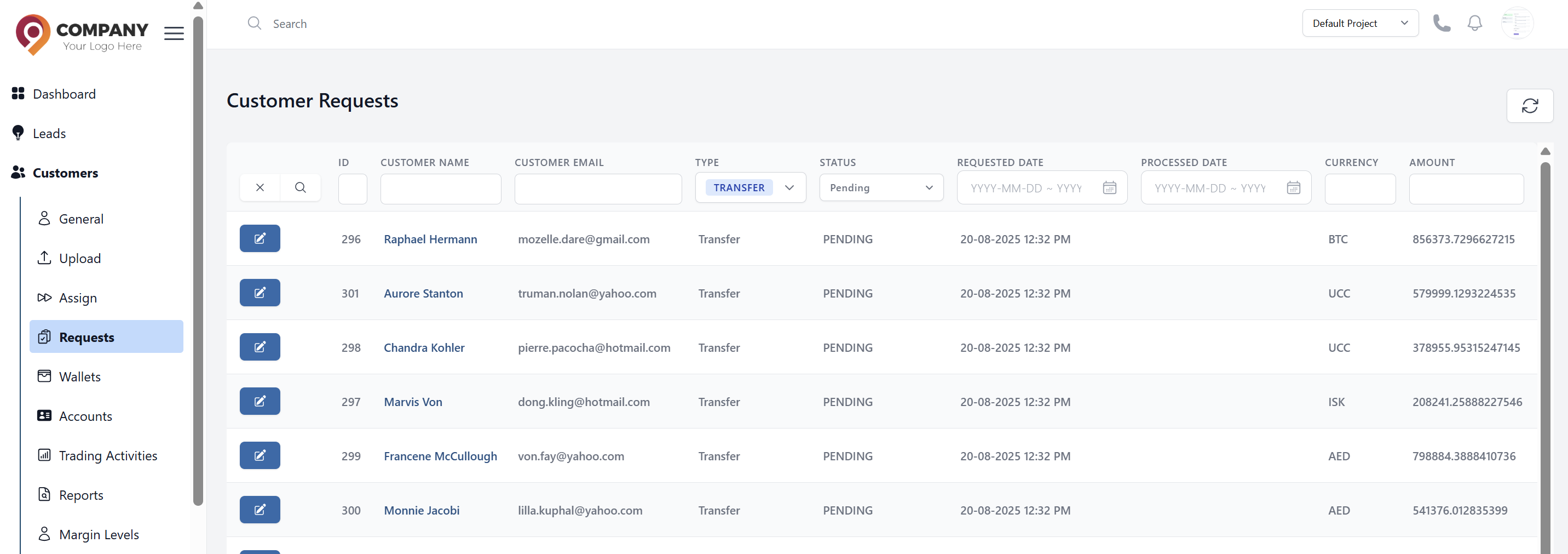
3. Review the Request Details
- Click on the row to expand it and view all details.
- Carefully check the following information:
- Amount: The requested transfer amount.
- From Account/Wallet: Verify the source account/wallet has sufficient balance.
- To Account/Wallet: Ensure the destination account/wallet is correct and active.
- Currency: Confirm both wallets use the same currency to avoid conversion issues.
4. Take Action: Approve or Reject
- After your review, click either the Approve or Reject button at the end of the row.
If Approving:
- A confirmation dialog will appear.
- Click Approve to finalize the approval.
- The system will automatically process the transfer between wallets, and the status will change to
Approved.
If Rejecting:
- A pop-up will appear prompting you to select a Rejection Reason.
- Choose the most appropriate reason from the pre-configured list in TR Settings > Resolutions.
- You can add an optional note for the customer to provide more context.
- Click Reject. The status will change to
Rejected, and funds will remain in the source wallet.
What Happens Next?
- On Approval: The customer will automatically receive a confirmation email. The funds will be moved between wallets immediately, and the transaction will be logged in the main Transactions list.
- On Rejection: The customer will receive an email notifying them of the rejection and the reason provided. They may submit a new request with corrected information.
Best Practices & Tips
- Balance Verification: Verify that the source wallet has sufficient funds before approval.
- Wallet Compatibility: Ensure both wallets are active and support the same currency.
- Customer Confirmation: For large transfers, consider confirming with the customer via additional channels.
- Security Check: Verify that both wallets belong to the same customer for internal transfers, or validate recipient details for external transfers.