View Trading Activities
Applies to: Administrators, Compliance Officers, Risk Managers
The Trading Activities section provides a comprehensive view of all trading operations across customer accounts, offering detailed insights and filtering capabilities.
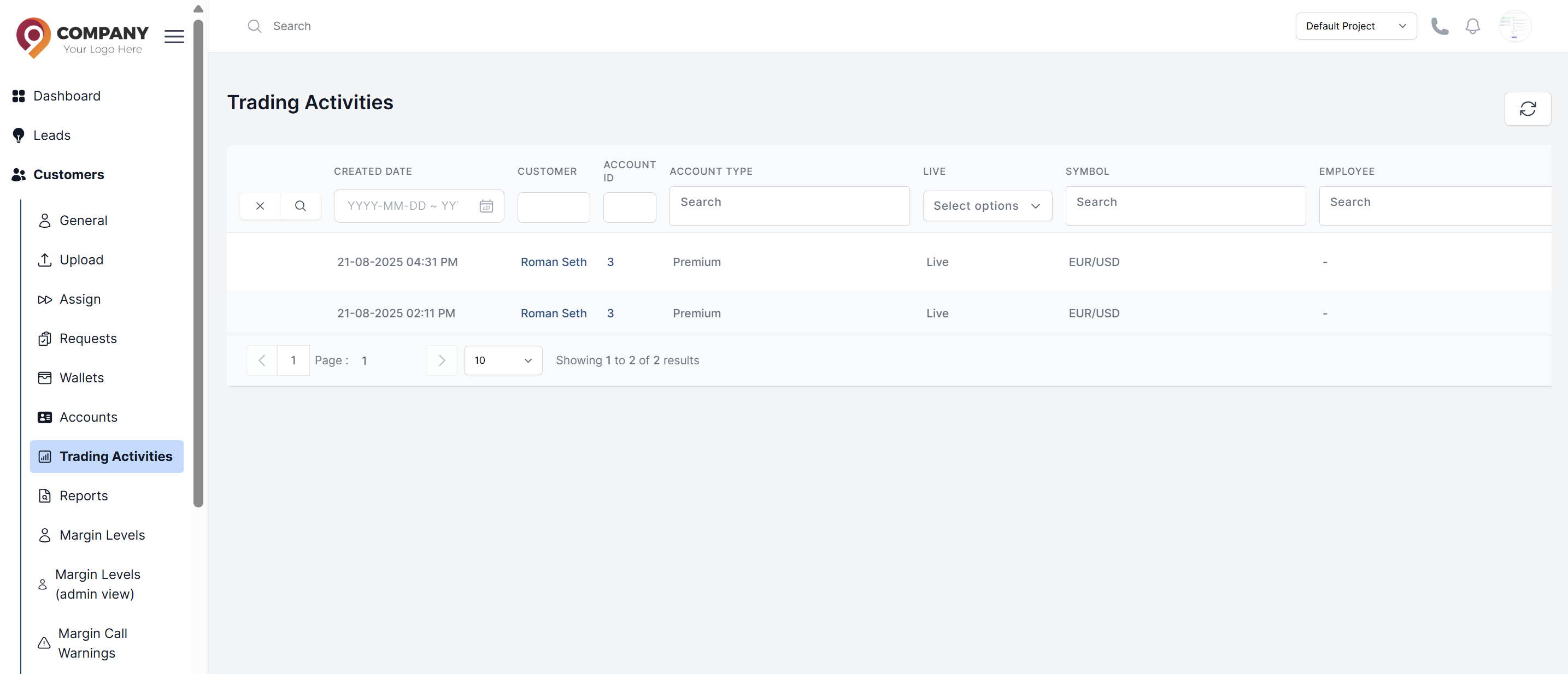
Accessing Trading Activities
- Navigate to Customers > Trading Activities
- You will see a complete table of all trading events with advanced filtering options
Understanding the Data Table
The table includes detailed columns such as:
- Account ID: The trading account number
- Customer Name: Name of the account owner
- Account Type: The trading account type
- Symbol: Symbol related to the activity
- Activity Type: Trading activity type happened
Advanced Filtering Capabilities
Use the powerful filters to analyze specific data:
Time-Based Filtering
- Date Range: Select custom date ranges
- Time Period: Pre-set periods (Today, Yesterday, Last 7 Days, Last 30 Days, This Month, Last Month)
Trade-Based Filtering
- Symbol: Filter by specific trading instruments
- Action Type: Filter by open/close/modify operations
Account-Based Filtering
- Account Type: Filter by Live/Demo accounts
- Currency: Filter by account currency
Real-time Monitoring Features
- Live Updates: Table updates in real-time as trades occur
- Auto-refresh: Auto refresh the table
Using Data for Analysis
Risk Management
- Identify unusually large positions
- Monitor high-frequency trading patterns
- Detect potential manipulative trading
Viewing Individual Customer Activity
To see trading activity for a specific customer:
- Go to Customers > List of all customers
- Select the specific customer
- Navigate to the Trading Activity tab in their profile
- View their personal trading history with the same filtering capabilities